
The short version
A dieline is the 2D engineering drawing of a package laid out flat — front face, back, side walls, top, base, dust flaps, and glue tabs all visible at once. Printers and packaging manufacturers use it to know exactly where to put artwork, where to cut, and where to crease so the paperboard folds into a box.
If a designer hands the printer a finished mockup of just the front of a box, the printer can't make anything from it. They need the dieline — the flat template — with the art mapped onto every panel.
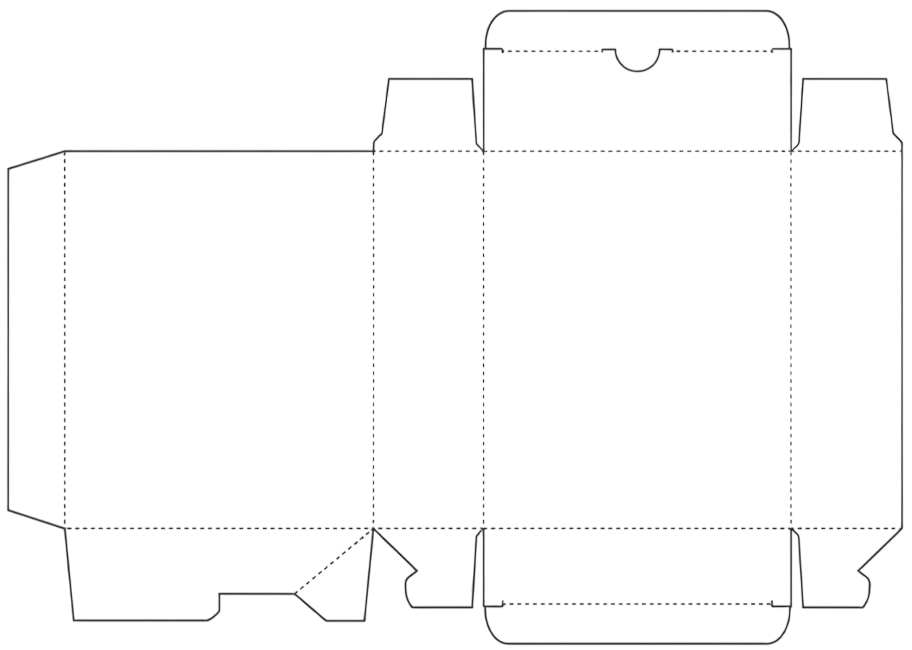
A typical dieline: every panel, fold, and glue tab laid out flat.
Other names you'll see
Different industries and regions call the same thing different names. If a supplier emails you any of these, they mean the dieline:
- Die line or die-line — same word, different spacing
- Keyline — common in print and prepress
- Box net or carton net — the geometric "net" of an unfolded box
- Flat-pack template — common with e-commerce-friendly mailers
- Structural design — what most packaging engineers say
- Packaging blueprint or packaging spec — informal
- CAD file — common from overseas suppliers who designed the structure in ArtiosCAD or similar
- Cutter guide or cut-and-crease — what the print shop calls it on the press
- Knife line — the cut path itself
What's actually on a dieline
- Cut lines (usually solid magenta) — the knife path that trims the paperboard
- Fold or crease lines (usually dashed, a different color) — where the box bends
- Bleed — extra art beyond the cut line so a millimeter of trim drift doesn't show white edges
- Safe area — a margin inside the cut where important text and logos belong
- Glue tabs — flaps that get glued to the inside of the opposing panel
- Dust flaps — the small flaps that close before the main lid tucks in
Dielines are usually delivered as PDF, Adobe Illustrator (AI), or SVG — all vector formats, because the lines need to stay sharp at any size.
Where do dielines come from?
Almost always from the printer or packaging manufacturer. They pick a stock structural design that fits your product (dimensions, weight, closure style) and send you the dieline as an empty template. Your job is to fill it with artwork and send it back.
This holds whether you're working with a local print shop, a custom-packaging service like Packlane or Lumi, or an overseas supplier on Alibaba or IndiaMart. You can also pull free templates from Packmage, Packlane's gallery, or Adobe Stock — but you still need a way to design on them.
The traditional problem
Designing on a dieline has historically meant Adobe Illustrator — a $20+/month subscription, a steep learning curve, and a workflow built for professional designers. If you're a brand owner, a small-batch maker, or a marketing manager who just received a dieline from your supplier, that's a heavy lift for what should be a simple job: put your logo and product info on each panel.
How Pack AI helps
Pack AI is a browser-based editor built specifically for dielines. No Illustrator, no install, no design background required.
- Drop in any dieline — PDF, AI, or SVG. Pack AI parses the vector paths and detects each panel automatically (front, back, sides, flaps, tabs).
- Design panel-by-panel — add text, logos, images, gradients, and shapes to each face independently without worrying about overflowing the cut lines.
- Read the printed dimensions off the source label so you know which face is which.
- Generate a first draft from a brief — describe your product in a sentence and AI packaging design produces a typographic mockup mapped onto every panel, including rotated side-wall text.
- Export print-ready in SVG, PDF, AI, PNG, or JPEG at 300 DPI — the formats your printer actually expects.
A typical workflow
- Supplier emails you a dieline as a PDF or AI file.
- You drop it onto the Pack AI editor.
- Pack AI detects each panel; you design on top of the cut and fold lines.
- Export in your printer's preferred format.
- Send the file back to the supplier; they print and fold.
Got a dieline waiting in your inbox?